UK Passport Photo Requirements: Size & Digital Photo Rules
UK passport photo requirements: 35x45 mm prints, digital photo size, background, glasses and clothing rules. Based on HM Passport Office guidance.
Preview only: this tool exports a 413 x 531 px image with a replaced background. GOV.UK requires unaltered photos; do not submit this export for a UK passport.
Make your UK passport photo
Everything runs on your device. Your photo is never uploaded.
Drag a photo here, or
JPEG, PNG or WebP, up to 25MB
Requirements at a glance
| Photo size | 35 × 45 mm (413 × 531 px at 300 DPI) |
|---|---|
| Head height, chin to crown | 29.0 mm – 34.0 mm (64% – 76% of height) |
| Background | Plain cream or light grey, with no shadows |
| File | JPEG |
Source:www.gov.uk· last checked 2026-09-09
Size and framing
The frame, head-height range and eye position below follow this document’s specification. Eye guides appear only where a range is specified.
- 1
- Photo size35 × 45 mm (413 × 531 px at 300 DPI)
- 2
- Head height, chin to crown29.0 mm – 34.0 mm (64% – 76% of height)
Only the listed measurements are checked automatically. Expression, lighting, photo age and rules on editing still need your attention.
Photo examples
A straight head, visible eyes and even lighting make a clear starting photo. Check the rules for your document before applying.
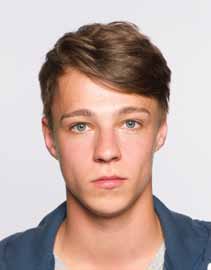
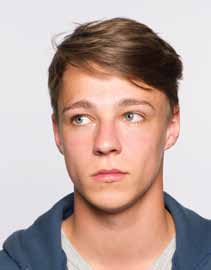
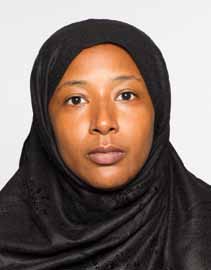
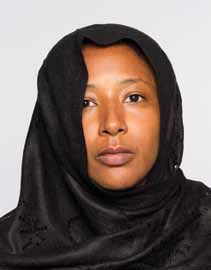
Illustrations of pose and framing, not photos to submit or a guarantee of acceptance. Examples adapted from GOV.UK.
GOV.UK· © Crown copyright · Open Government Licence v3.0
Why photos get rejected
- Head outside the 29 mm to 34 mm range from chin to crown
- Any shadow on the face or behind the head
- Head covering worn without a religious or medical reason
- Eyes obscured by hair, glasses frames or a glare on the lenses
- Anything else visible in the frame, including a second person or a chair back
- Photo taken more than one month before applying, even if your appearance has not changed
- Photo altered by computer software, including background replacement
Printed UK passport photo requirements
For a paper application, you need 2 identical printed photos, each 35 mm wide and 45 mm tall. The distance from your chin to the crown of your head must be 29 mm to 34 mm. The measurements in the table above refer to this printed format.
Photos must be clear, in colour, unaltered by computer software and printed to a professional standard on plain white photographic paper without a border. They must have been taken in the last month, even if your appearance has not changed. Follow the official printed photo rules for the full requirements.
Digital photo requirements for an online application
An online application needs a digital photo, not a scan of the printed format. The official digital photo rules require a photo that is:
- At least 600 pixels wide and 750 pixels tall.
- At least 50 KB and no more than 10 MB.
- Clear, in focus, in colour and unaltered by computer software.
- Taken against a plain, light-coloured background with no shadows.
If you take the photo on your own device, include your head, shoulders and upper body. Do not crop it yourself; the application service crops it for you. You can also obtain a digital photo code from a photo booth or shop.
Background, clothing and glasses
Printed photos need a plain cream or light grey background. Digital photos need a plain light-coloured background. Both need clear contrast and no shadows on your face or behind you. Use an appropriate background when taking the photo; software replacement does not satisfy the unaltered-photo rule.
Face forward with your eyes visible and your mouth closed. Keep hair and clothing away from your face. Head coverings are allowed only for religious or medical reasons. A shirt that contrasts with the background can help, but GOV.UK does not prescribe a shirt colour.
Avoid glasses unless you have to wear them. If you do, your eyes must remain visible without tinted lenses, frame obstruction, glare or shadows. Children under 6 do not need a plain expression or to look directly at the camera; children under 1 do not need their eyes open. See the official guidance for the other rules for babies and children.
What this preview can and cannot provide
This tool produces a 413 x 531 pixel image, corresponding to 35 x 45 mm at 300 DPI, and a 4 x 6 inch print sheet. These downloads are previews for checking framing and layout, not photos to submit for a UK passport.
The tool replaces the background, while both printed and digital UK passport photos must be unaltered by computer software. The single-image export is also smaller than the digital minimum. Increasing its DPI or enlarging it would not resolve the alteration issue. Use an unaltered original following GOV.UK guidance, or obtain photos from a photo booth or shop. Photos opened here stay on your device.
Common questions
- What size is a UK passport photo?
- Printed photos must be 35 mm wide by 45 mm tall. At 300 DPI that is 413 x 531 pixels. Digital photos have different requirements, including a minimum of 600 x 750 pixels.
- How tall should my head be in the photo?
- Between 29 mm and 34 mm from the bottom of your chin to the top of your head, hair included.
- Can I smile?
- Adults and children aged 6 or over need a plain expression with their mouth closed. Children under 6 do not need a plain expression or to look directly at the camera.
- Can I use this photo for the digital application?
- No. This tool exports 413 x 531 pixels, below the 600 x 750 pixel minimum, and replaces the background. GOV.UK requires unaltered photos and says not to crop photos taken on your own device for an online application.
- What are the clothing requirements for a UK passport photo?
- Keep your face and eyes visible. Head coverings are only allowed for religious or medical reasons. GOV.UK does not specify a shirt colour; clothing that contrasts with the background is a practical choice, not an official requirement.
- Can I wear glasses?
- Avoid glasses unless you have to wear them. If necessary, they must not be tinted or sunglasses, and the frames, glare, reflections and shadows must not cover your eyes.
- How recent must the photo be?
- It must have been taken in the last month. You need a new photo for a new passport even if your appearance has not changed.