Free Online US Passport Photo — 2x2 in Requirements
Free 2x2 in US passport photo maker. Correct head height, eye line, white background and a printable 4x6 sheet. Works in your browser — nothing is uploaded.
Make your US passport photo
Everything runs on your device. Your photo is never uploaded.
Drag a photo here, or
JPEG, PNG or WebP, up to 25MB
Requirements at a glance
| Photo size | 50.8 × 50.8 mm (600 × 600 px at 300 DPI) |
|---|---|
| Head height, chin to crown | 25.4 mm – 34.9 mm (50% – 69% of height) |
| Eye height above bottom edge | 28.6 mm – 34.9 mm (56% – 69% of height) |
| Background | Plain white or off-white |
| File | JPEG |
Source:travel.state.gov· last checked 2026-09-03
Size and framing
The frame, head-height range and eye position below follow this document’s specification. Eye guides appear only where a range is specified.
- 1
- Photo size50.8 × 50.8 mm (600 × 600 px at 300 DPI)
- 2
- Head height, chin to crown25.4 mm – 34.9 mm (50% – 69% of height)
- 3
- Eye height above bottom edge28.6 mm – 34.9 mm (56% – 69% of height)
Only the listed measurements are checked automatically. Expression, lighting, photo age and rules on editing still need your attention.
Photo examples
A straight head, visible eyes and even lighting make a clear starting photo. Check the rules for your document before applying.
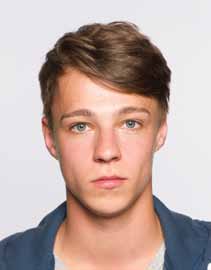
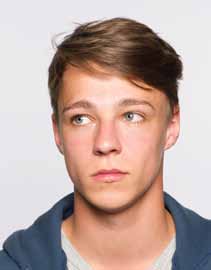
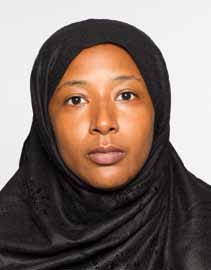
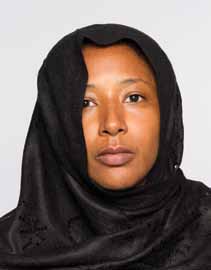
Illustrations of pose and framing, not photos to submit or a guarantee of acceptance. Examples adapted from GOV.UK.
GOV.UK· © Crown copyright · Open Government Licence v3.0
Why photos get rejected
- Head is too large or too small, the single most common reason for rejection
- Shadows on the face or on the background behind the head
- Glasses worn in the photo, which have not been accepted since 2016
- A background that is patterned, coloured or too dark
- Visible smile showing teeth, rather than a neutral expression
- A photo older than six months, or one already used on a previous passport
What the State Department actually checks
A US passport photo is 2 x 2 inches square, and two measurements inside that square decide whether it passes. Your head, measured from the bottom of the chin to the top of the head including hair, must be between 1 inch and 1 3/8 inches tall. Your eyes must fall between 1 1/8 and 1 3/8 inches above the bottom edge.
Those two rules are why so many self-made passport photos come back rejected. People crop to a 2 x 2 square, which is easy, and then get the head size wrong, which is not. A photo can be perfectly square, perfectly lit and still fail because the face fills too much of the frame.
How this tool positions your photo
Upload a photo and the tool finds your chin, the top of your head and your eye line, then works backwards: it calculates the crop that puts your head at the middle of the permitted size range and your eyes in the middle of the permitted band. Aiming for the middle rather than the edge of each range leaves room for the small errors any automatic measurement makes.
If your original photo does not have enough space around your head to make a compliant crop, the tool says so and tells you which edge is short, instead of cropping tighter and quietly handing you something that will be turned down. In that case, retake the photo standing further back.
The background is replaced with plain white. Everything runs inside your browser using WebAssembly, so your photo is never uploaded to a server and never leaves your device.
Printing at home or at a counter
The cheapest route is a 4 x 6 inch photo print. A 2 x 2 inch photo tiles exactly three across and two down on 4 x 6, so one print gives you six passport photos for the price of a single snapshot. Download the sheet, upload it to any photo counter or print it borderless at home, then cut along the guide lines.
For an online renewal you do not need to print anything. Download the single 600 x 600 pixel JPEG and upload it directly.
Common questions
- What size is a US passport photo?
- Exactly 2 x 2 inches, which is 51 x 51 mm. At 300 DPI that is 600 x 600 pixels.
- How tall does my head need to be?
- Measured from the bottom of your chin to the top of your head, between 1 inch and 1 3/8 inches (25 mm to 35 mm). Your eyes must sit between 1 1/8 and 1 3/8 inches above the bottom edge.
- Can I wear glasses?
- No. Glasses have not been permitted in US passport photos since November 2016, except with a signed medical statement.
- Can I print this at a drugstore?
- Yes. Download the 4x6 inch sheet, which holds six copies, and print it as a standard photo at any counter. Then cut along the guide lines.